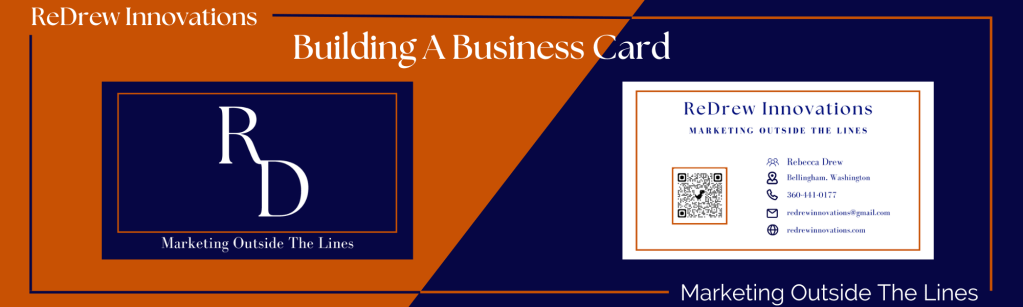
In a digital world having a business card might seem outdated, but in the right context, a business card could give you a competitive edge. A business card is supposed to be representative of your brand, it serves as a visual aid and can help with recall for potential leads.
Business cards can be the first exposure a user has to your brand so it’s important that the business card reflects the personality of the brand and gives a winning first impression.
Business cards are also viewed differently in each country. For example, in some Asian countries, business cards are presented with two hands. Read this article by Brandly to find out more information on how business cards are viewed in different countries. Now let’s dive into the elements needed to make the perfect business card.
Elements Of A Business Card
Business cards are open to endless possibilities of styles and functions but for the most part, they should include your:
- Name
- Logo
- Tagline
- Contact Information
Other elements that dictate your business card design include:
- Fonts
- Color Schemes
- Texture and Paper Stock
All of this information should be included in your brand’s creative brief. A creative brief is a document that provides background info for the creative team to develop a creative strategy for the brand. You can check out an example of ReDrew Innovation’s creative brief for a guideline on what yours could look like. Having a creative brief will help to create consistency within your brand, regarding the audience, personality, and design.
Your brand’s design elements must be aligned with your target audience. Your creative brief will help you determine who that audience is and what design elements will be best to convert them.
Logo
One of the hardest parts of creating a business card is locking down a logo. There are 3 types of logos you can create for your brand. Icon base, name base, or initial based

If you aren’t well at design like myself, it can be difficult to create a logo so if you need inspiration, here are some resources I used to get ideas for my logo. With Tailor Brand (https://www.tailorbrands.com/logo-maker), you enter your brand name, tagline, and a few other pieces of business information, and an AI algorithm creates various business logos for your brand.
If you would like to do some more research on the principles of design check out this article by Designers.
Where To Make Your Business Card
As you might know, an SVG file stands for a scaleable vector graph. It is used for illustration as it can be scaled up and down without losing resolution. Which is why it is used by many designers use them. If you’re able to, I highly recommend creating your logo as an SVG file and then uploading it to your business card.
There are many places where you can design and print your business cards. I recommend using Canva for creating your business card design and printing it. They offer great prices and free shipping! Plus they have thousands of templates to choose from. Either choose one that represents your brand personality or start from scratch.
Steps In The Design Process
- Choose your business card shape
- Choose your card size, considering the bleed area (you can see this using Canva)
- Add logo and other graphics
- Add necessary text (name, company, job title, phone number, email, website URL, social media, location, QR code, slogan, etc.
- Choose the font, font size, font color
- Choose special finishes (gloss, or matte)
- Leave some “white” space
- Proofread your card
- Use a CTA like a discount code, promo code, or QR code
Your business card says represents not only your brand but yourself. Don’t cut corners when designing your card. The tip I can give you for designing your business card is to spend ample time designing your card.
 ReDrew Innovations
Leave a comment